MaxTrax 8 is here
Every weld, from drawing to turnover, in one record.
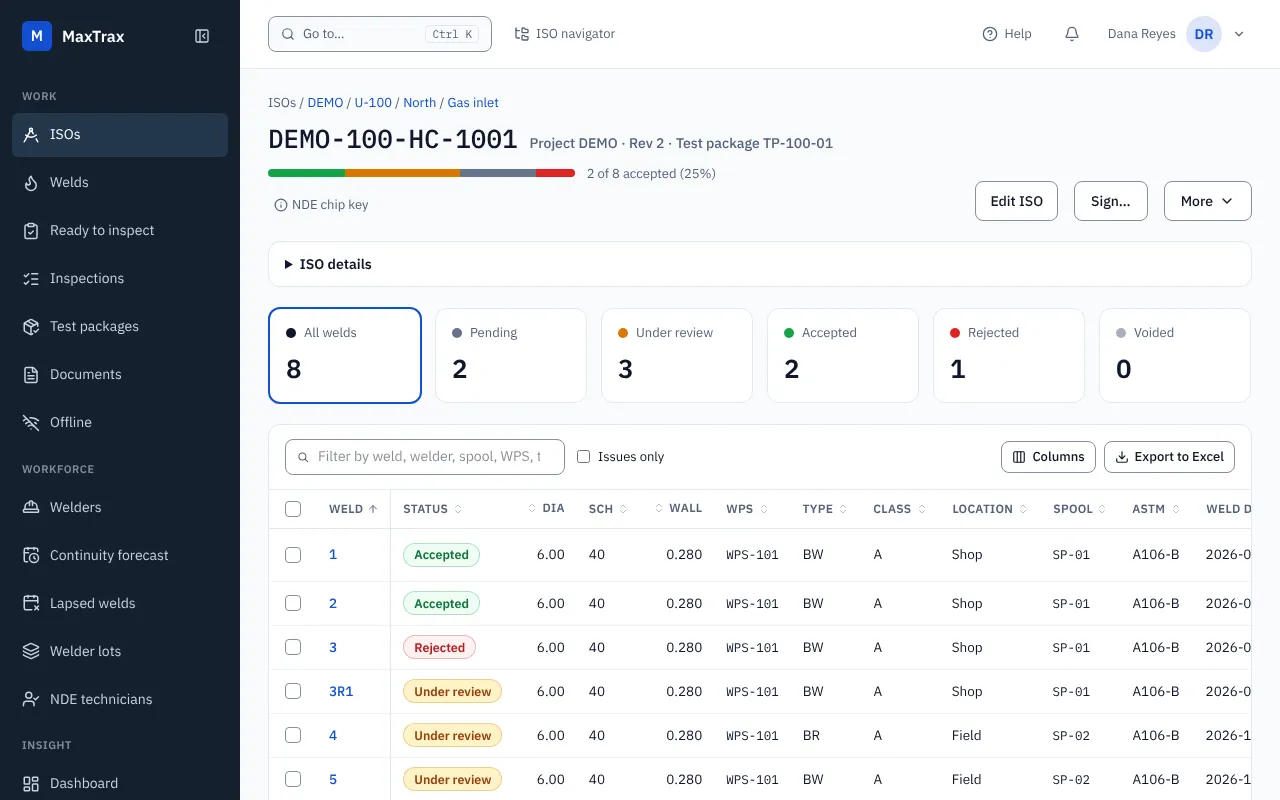
MaxTrax tracks the drawings, welds, inspections, NDE and test packages on piping, structural steel and plant construction projects. MaxTrax 8 puts a faster, clearer screen on that record, and it works on a tablet on site.
Weld tracking for major energy projects since 1995.
- 8.0.1
- current release
- 30+
- years in production
- 300,000+
- welds tracked on live projects
- 5
- continents of live projects
What your team gets
The weld, its inspections and its welder, one click apart.
Spreadsheets hold the welds. They do not tell you which inspection is overdue or which welder is about to lapse. MaxTrax does, from the same record.
One place for each weld
Open a weld to see its inspections, repairs and heats in one panel. Press Ctrl K and type part of a drawing number to jump to any drawing.
Ready to inspect
Every requested inspection still waiting for a result, across up to five projects. NDE technicians start their day there.
Qualifications that watch themselves
A continuity forecast for the next 30, 60 and 90 days, the welds made after a lapse, and welder lots for progressive examination.
Numbers you can defend
A project dashboard, PDF and Excel reports, scheduled reports by email, and a Power BI connection. Each figure says how it is counted.
Already on MaxTrax?
An upgrade, not a move.
Your projects, drawings, welds, inspections and test packages are already in MaxTrax 8. What changes is the screen in front of them.
Nothing to migrate
No export, no re-import, no re-keying. Rejects, repairs, inspection rates and reports work the way your team knows.
Classic view one click away
Anyone who wants the screens they know can switch back from the menu, at any time.
Help on every screen
Each screen has its own help page with pictures. The same pages are public in MaxTrax Help.
Where it runs
We host it, or you do.
Same product, same record, three ways to run it. Pick the one your IT and InfoSec teams will approve.
Hosted by CSDS
We run your site on Microsoft Azure, with its own database. Your team uses MaxTrax; we run the servers.
In your own Azure
The same app on Azure App Service and Azure SQL Database, in a subscription you own.
On your own servers
Windows, IIS and SQL Server, with no connection back to CSDS. Installing and upgrading is a .zip file.
Who uses it
Everyone on the project reads the same record.
Each role sees the projects and contractors it is allowed to see, and nothing else.
QC managers
Reject rate, repair rate and NDE backlog for the period you pick, and reports that match what the screens say.
Inspectors and NDE technicians
Every inspection waiting for a result, in one list. Record it from a tablet on site.
Document control
Export a project workbook, edit it, and bring it back. The change is checked row by row before anything is saved, and deleting a row removes nothing.
Welding supervisors
Which welders lapse in the next 30, 60 and 90 days, and which welds were made after a lapse.
Project managers
Test packages ready to sign, welds with data errors, and welded diameter-inches by week.
IT and InfoSec
Windows, IIS and SQL Server. Hosted by CSDS or on your own servers. Single sign-on with Microsoft or Google.
See MaxTrax 8 with your kind of project.
Tell us how you track welds today and what slows you down. We will show you the screens that answer it.